Web Data Connection Setup Assistant
Reducing web data connection setup from ~15 days with a specialist to ~15 minutes self-serve.
Salesforce Data Cloud was growing fast — fast enough that the organization was largely oriented around shipping functionality, not refining the experience of using it. The product had been built primarily by engineers, for engineers, and it showed. The result was a capable but unforgiving platform that routinely exceeded the technical comfort level of the admins and operators who were actually responsible for setting it up.
My team's mandate was to identify where this mismatch between user capability and product complexity was creating the most friction — and to fix it.
A Promise of a Quick Path
Our "Voice of the Customer" data pointed to Web data connection setup as a key pain point. When customers wanted to enable real-time use cases — personalization, behavioral tracking, live segmentation — they had to configure a web data connection inside Salesforce Setup. The entry point was a single page with two blank input fields: one for a JSON schema, one for a "sitemap." That was it. No guidance, no examples in context, no indication of the effort required.
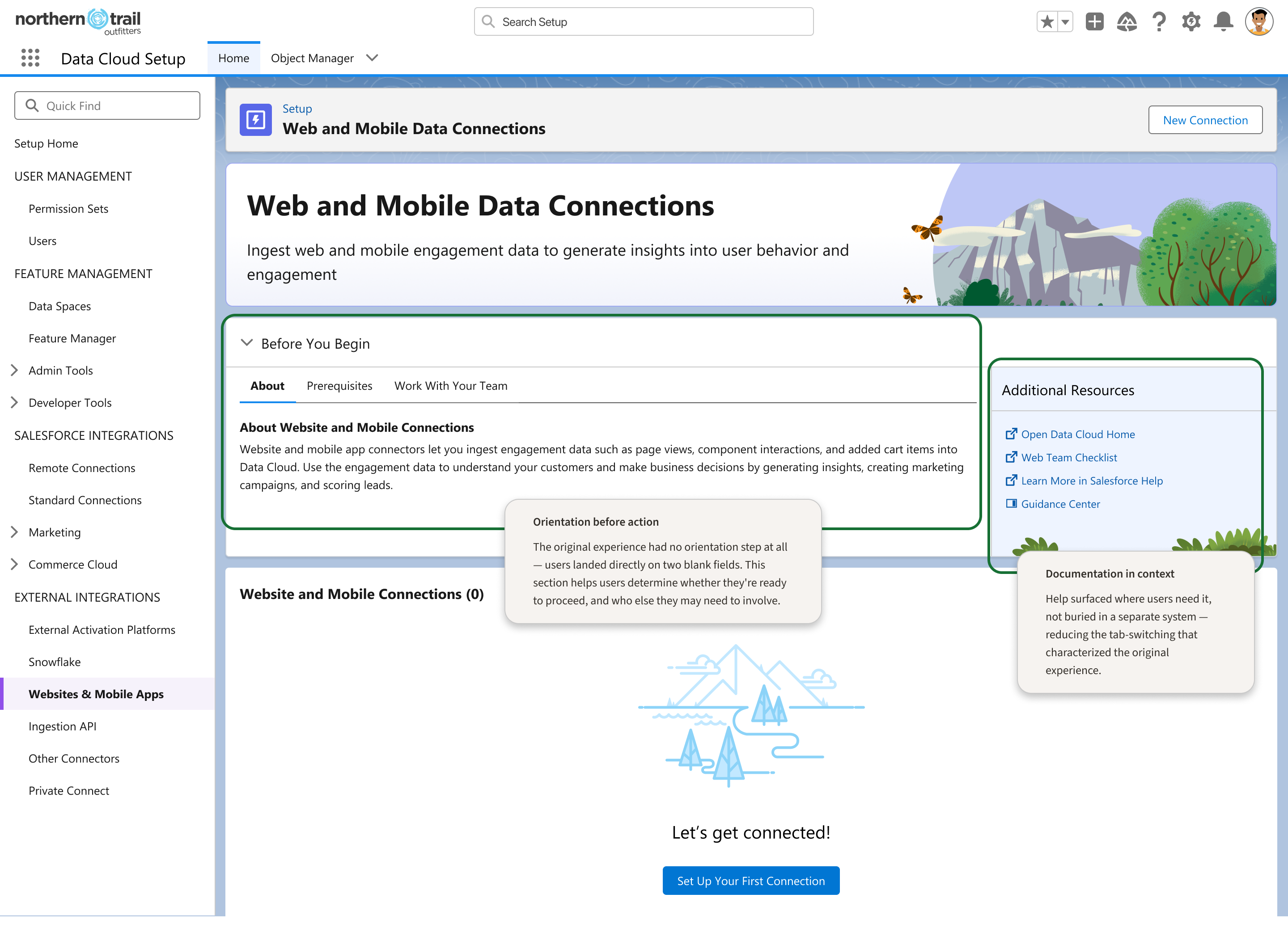 The original experience offered little orientation before action
What it didn't tell users:
"Schema" meant "the events you want to track on your website"
Defining those events required writing valid JSON by hand
"Sitemap" didn't mean the HTML sitemap they knew — it meant the routing logic for how their site's pages map to data structures
None of this came pre-populated; every event was custom, even the standard ones
The people encountering this setup step were typically CRM admins — skilled Salesforce operators, but not web developers or data engineers. They would hit this wall and do one of two things: abandon real-time use cases entirely, or hire a specialist to do it for them. That specialist engagement averaged around 15 days — and that was if they could find and afford one.
"Users needed better documentation for the JSON schema field"
"Users shouldn't need to write JSON at all — the product was asking the wrong thing from the wrong person"
Design Direction & Strategic Leadership
I directed this project as Senior Director, partnering closely with Michael Stallings who owned the day-to-day design execution. My contributions were primarily strategic and diagnostic:
Early conversations focused on who was doing the setup today — typically paid specialists. I pushed us to ask who should be able to do it: the CRM admin who already lived in Salesforce every day. That reframe changed what we were optimizing for.
When the team was focused on making the JSON input better, I pushed to zoom out. The actual workflow extended well past that first field — through event mapping, data stream creation, identity resolution, and deploying a tag to the customer's live website.
One of the early conversations was about the word "sitemap." It's a term with a well-understood meaning in web development — and it's not what Salesforce meant by it. We flagged this as a trust and comprehension problem, not just a documentation problem.
I met with Michael one to two times per week to review work in progress, pressure-test solutions, and help determine when to pursue ecosystem partnerships versus when to simplify.
Skilled Salesforce operator; lives in the platform every day; not a developer
who we redesigned forPaid contractor brought in for complex setup tasks
Comfortable with code, event schemas, and site architecture
Builds and maintains data infrastructure; most technically sophisticated
who the original experience was built forFinding the Right Solution
We explored several solution paths before landing on the right one.
The first instinct was to replace the JSON input with a visual event builder — add an event name, an API name, a field type, no code required. This was a genuine improvement, but it still required users to know which events to track and to find them on their site.
We explored pre-built event sets for common scenarios — marketing analytics, e-commerce, sign-up tracking. Engineering deprioritized it, and more importantly, we recognized it was still a workaround. It answered "give me a starting point" but not "make this accurate to my site."
We investigated integrating directly with WordPress, Adobe Launch, and Google Analytics — logging into these tools to read a user's existing event schema and pre-populate the connection. The WordPress path was technically viable but commercially complicated. The Adobe partnership didn't move fast enough.
The turning point came through our WordPress research. While investigating a direct WordPress integration, we realized that most WordPress sites were already running Google Analytics 4 — and GA4 operates on a standardized event schema. That meant that for any company using GA4, we already knew their event structure without them having to tell us. No OAuth. No integration agreement. No custom configuration. The GA4 path became the foundation of the final design.
We don't need users to write JSON at all — we can pre-populate the schema from GA4 + sitemap inference.
Self-serve setup in ~15 minutes — no specialist required.
A Guided, Automated Setup Flow
The final design replaced the blank JSON fields with a guided, five-step setup flow.
Empty state
The starting point surfaces use cases and expected roles so users know what they're setting up and whether they're the right person to do it.
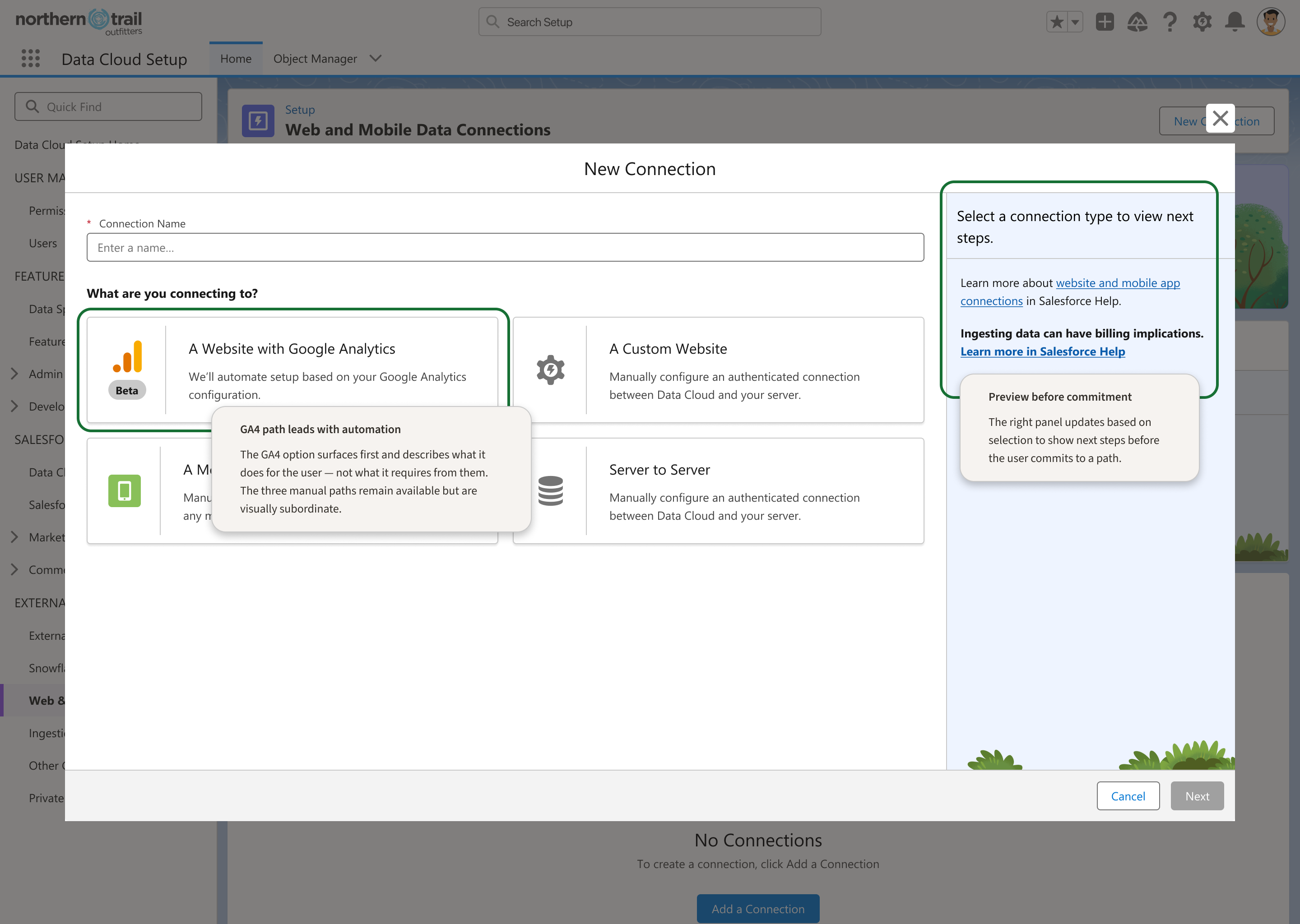
Choose connection type
Users select from GA4, custom, mobile app, or server-to-server — with plain-language guidance on when each applies.
Review inferred events
The system reads the user's GA4 setup and site structure to pre-populate events and sitemap mapping, drastically reducing manual input.
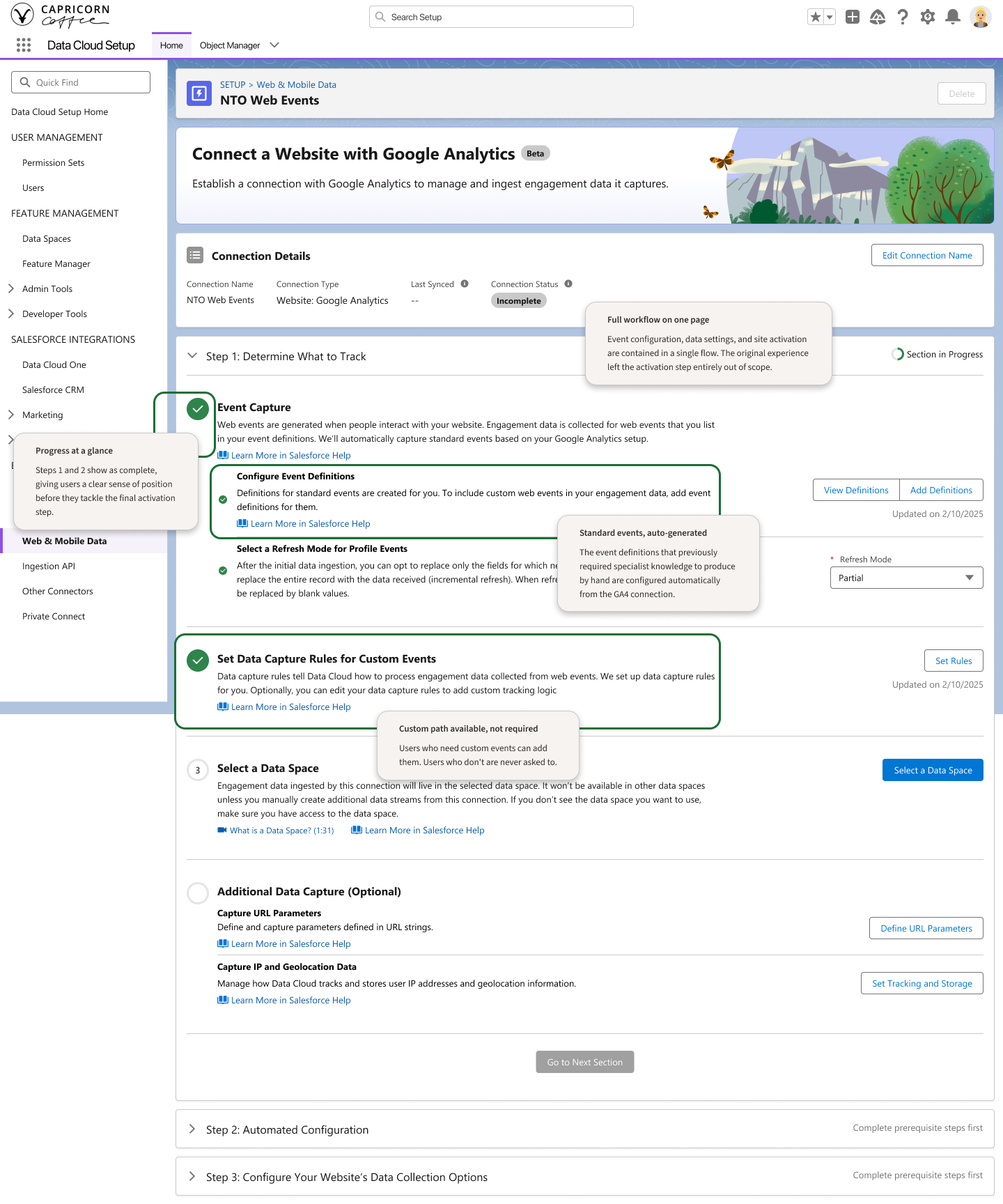
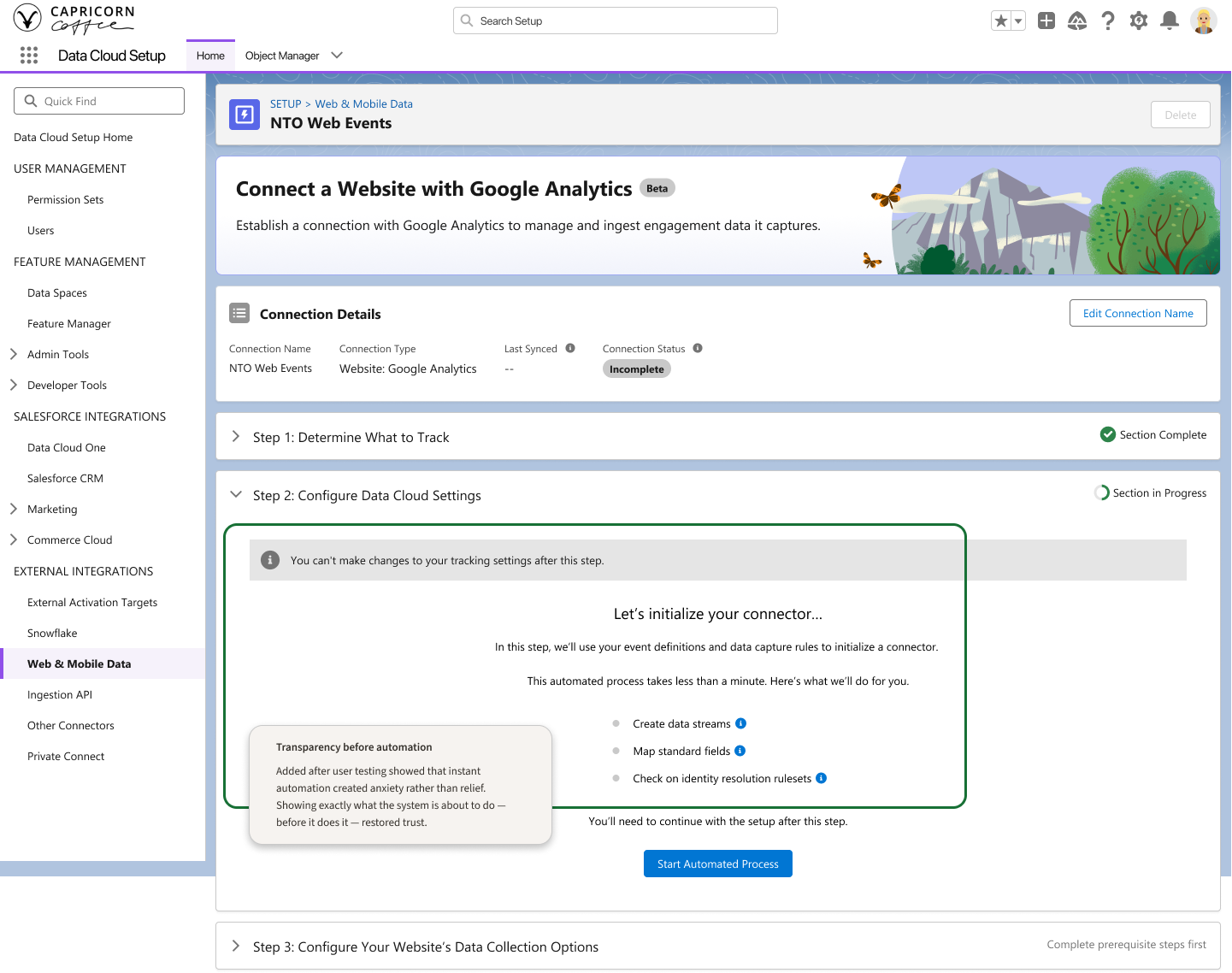
Confirm and configure
Users review the generated data stream configuration before activation, with clear explanations of what each field controls.
Activate via Google Tag Manager
The final step creates a GTM tag in a pending state, giving the user control over when it goes live without requiring manual JavaScript deployment.
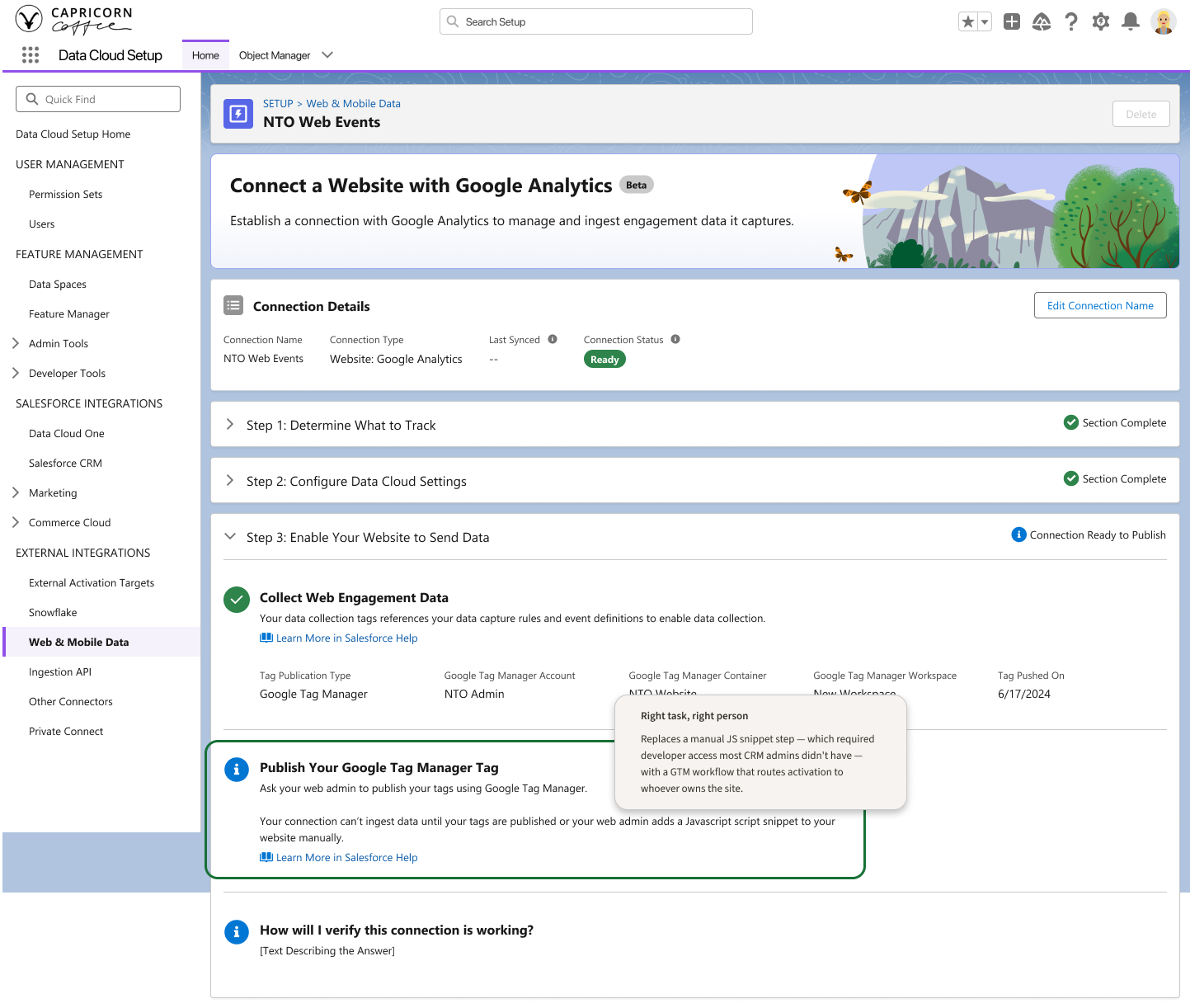
Key design decisions included:
Replacing "sitemap" with clearer, contextual language tied to the user's site structure
Pre-populating standard GA4 events so users only review, rather than invent, their schema
Creating a GTM tag in a pending state so activation is controlled and reversible
Keeping the experience inside Salesforce Setup rather than introducing a separate tool
The redesigned flow transformed web data connection setup from a specialist-dependent, multi-week engagement into a self-serve task most CRM admins could complete in minutes.
Beyond the efficiency gain, the project changed how the organization thought about setup UX in Data Cloud. It demonstrated that complex data infrastructure could be made accessible to the people actually responsible for operating it — without dumbing down the underlying capability.
The first design instinct was to improve the JSON input. The bigger opportunity was recognizing that the entire workflow was framed for the wrong user.
The GA4 insight came from observing what users already had in place. The best automation often doesn't require new integrations — it reads what's already there.
Michael Stallings did the hands-on design work. My role was to keep us pointed at the right problem, protect the project from scope drift, and create space for the solution to mature.
